
Need a hand? Contact Support or dial 611 from any LineOne phone.

Use this guide to update your holiday closures so calls are routed correctly when your office is closed.
Your LineOne phone system uses Time Frames to control call routing. Two of these, your Holiday and Closed Time Frames, let you automatically reroute calls when your office is closed for holidays or other reasons.
🛠️ Step 1: Log In to the Admin Portal
Go to portal.line.one
Log in using Admin@YOURDOMAIN
Not sure what your domain is? Contact Support
📆 Step 2: Open the Holiday Schedule
Click the Time Frames icon from the left menu.
Click the Holiday time frame from the list.
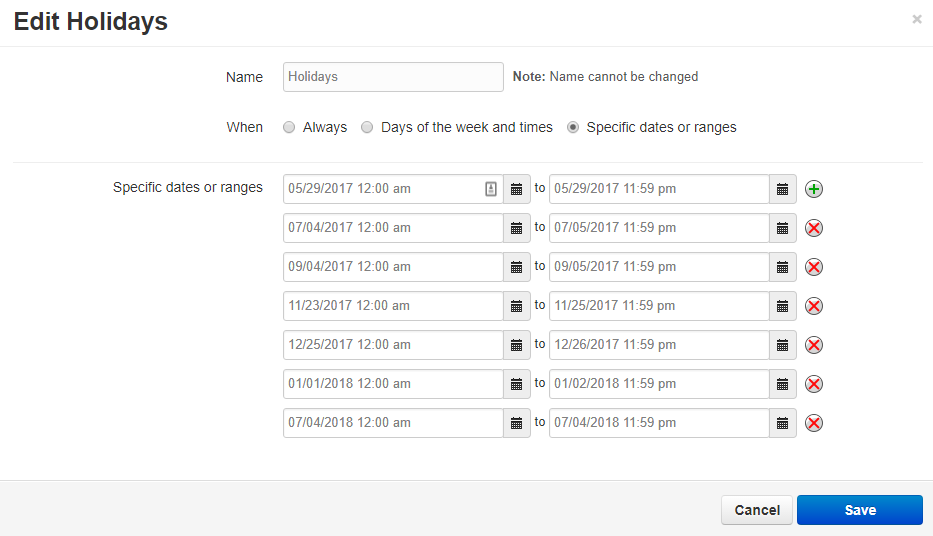
Add or edit dates to match your business closures.

📞 Need Help?
☎️ Dial 611 from your LineOne phone
📱 Call: (337) 417-9020
📧 Email: support@line.one
🌐 Visit: line.one/Support
We Make Business Phone Systems Easy